
PROFIT
See what you really made, after every cost.
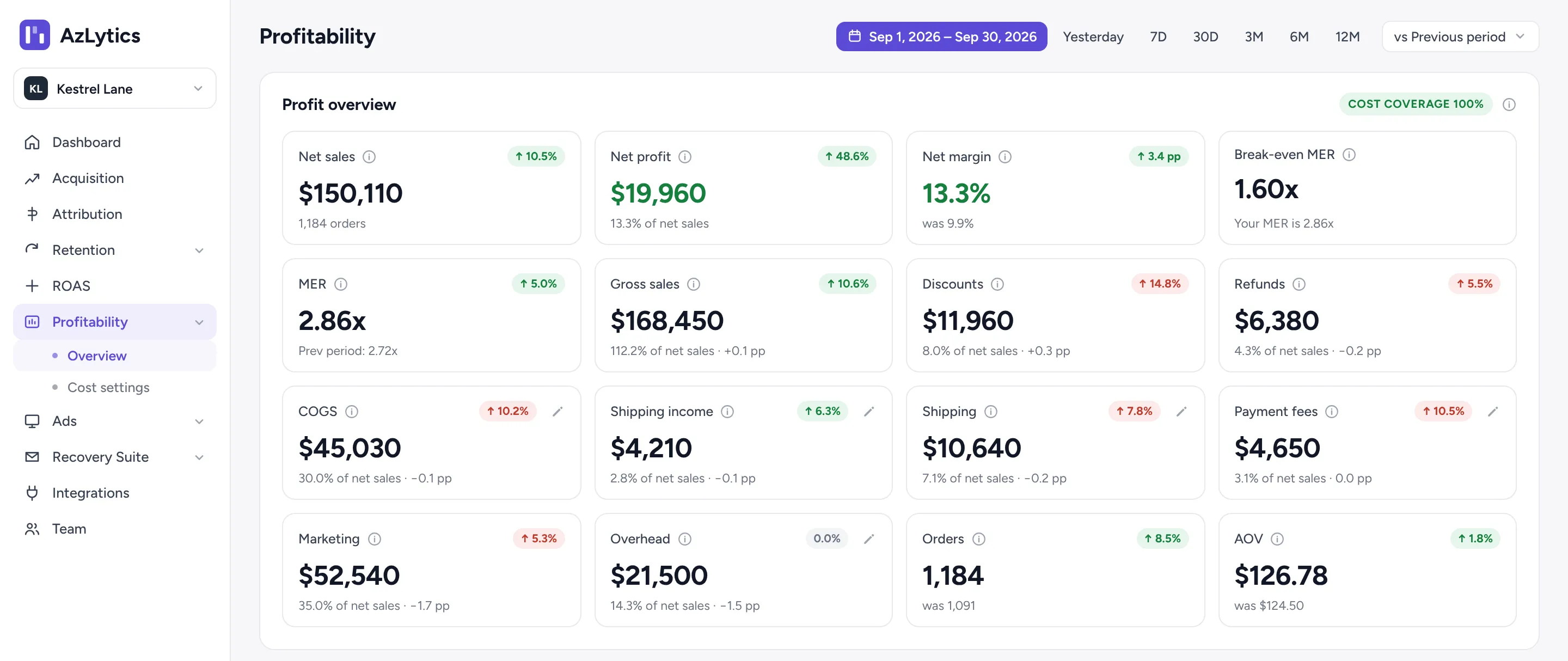
Revenue minus product costs, shipping, payment fees, ads and overhead. Your sales match Shopify to the cent, and if a cost is missing, AzLytics tells you instead of guessing.
- A full P&L down to net profit, with CM1, CM2 and CM3
- What each order really earns, week by week
- Your break-even point right next to your MER
- The products that actually carry your margin
Free during the pilot · No sales call · No developer · Cancel any time
SOUND FAMILIAR?
Sales are up. The bank balance isn’t.
Revenue is easy to see. What’s left after every cost is not.
THE PROBLEM
Your profit app looks healthy, but shipping and fees aren’t in it.
WITH AZLYTICS
Every cost line is listed. If one is missing, profit shows “incomplete”, so a gap can’t pass as a good month.
THE PROBLEM
ROAS looks fine, but you don’t know if the ads actually make money.
WITH AZLYTICS
Your MER sits next to your break-even MER. Above the line, ads pay. Below it, each extra dollar loses money.
THE PROBLEM
Supplier prices changed, and the spreadsheet didn’t.
WITH AZLYTICS
Raise costs with “+X% from date Y”. Past months keep the old cost, and the figures update in about 2 minutes.
HOW PROFIT IS WORKED OUT
See exactly where the money goes.
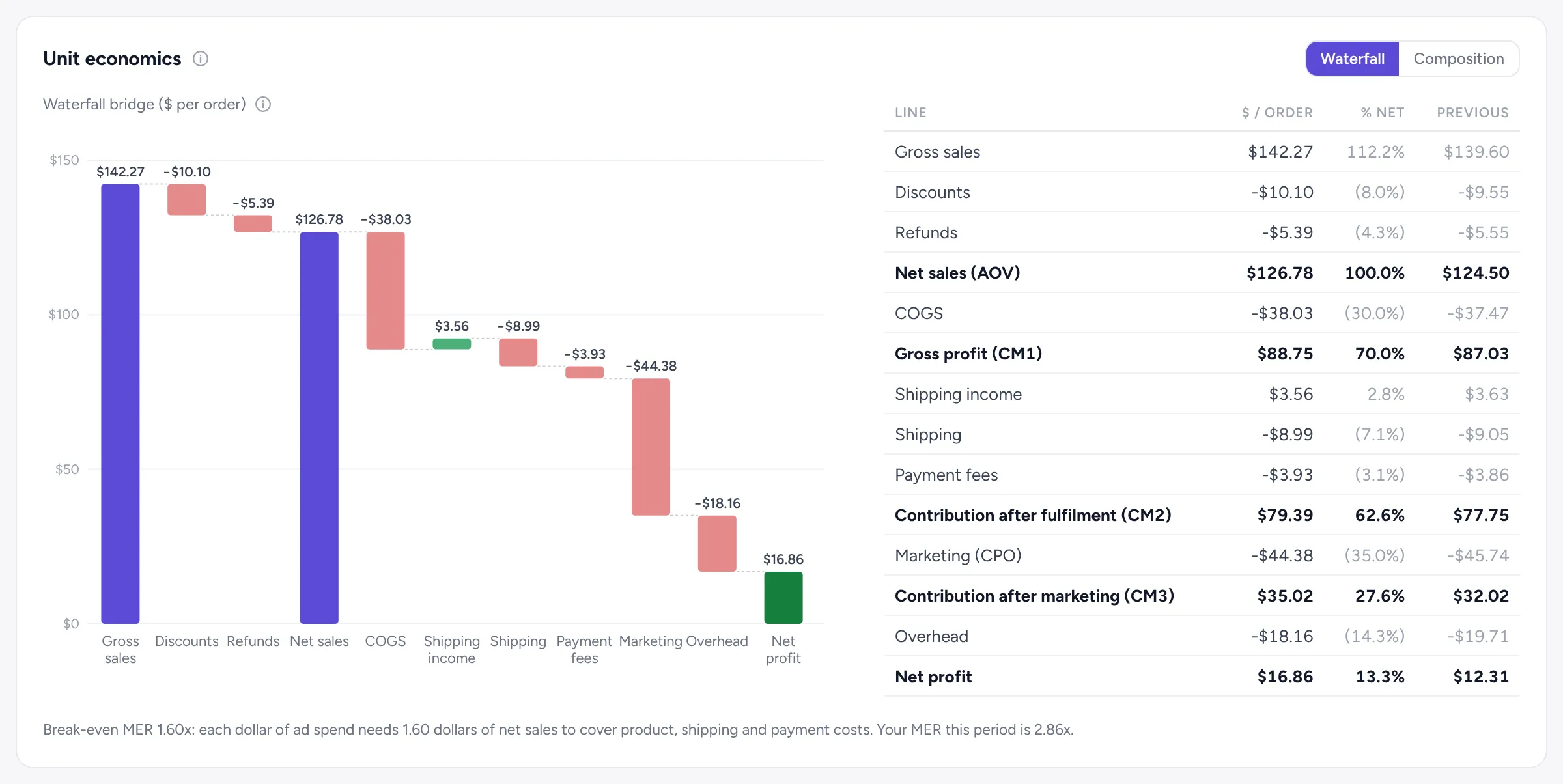
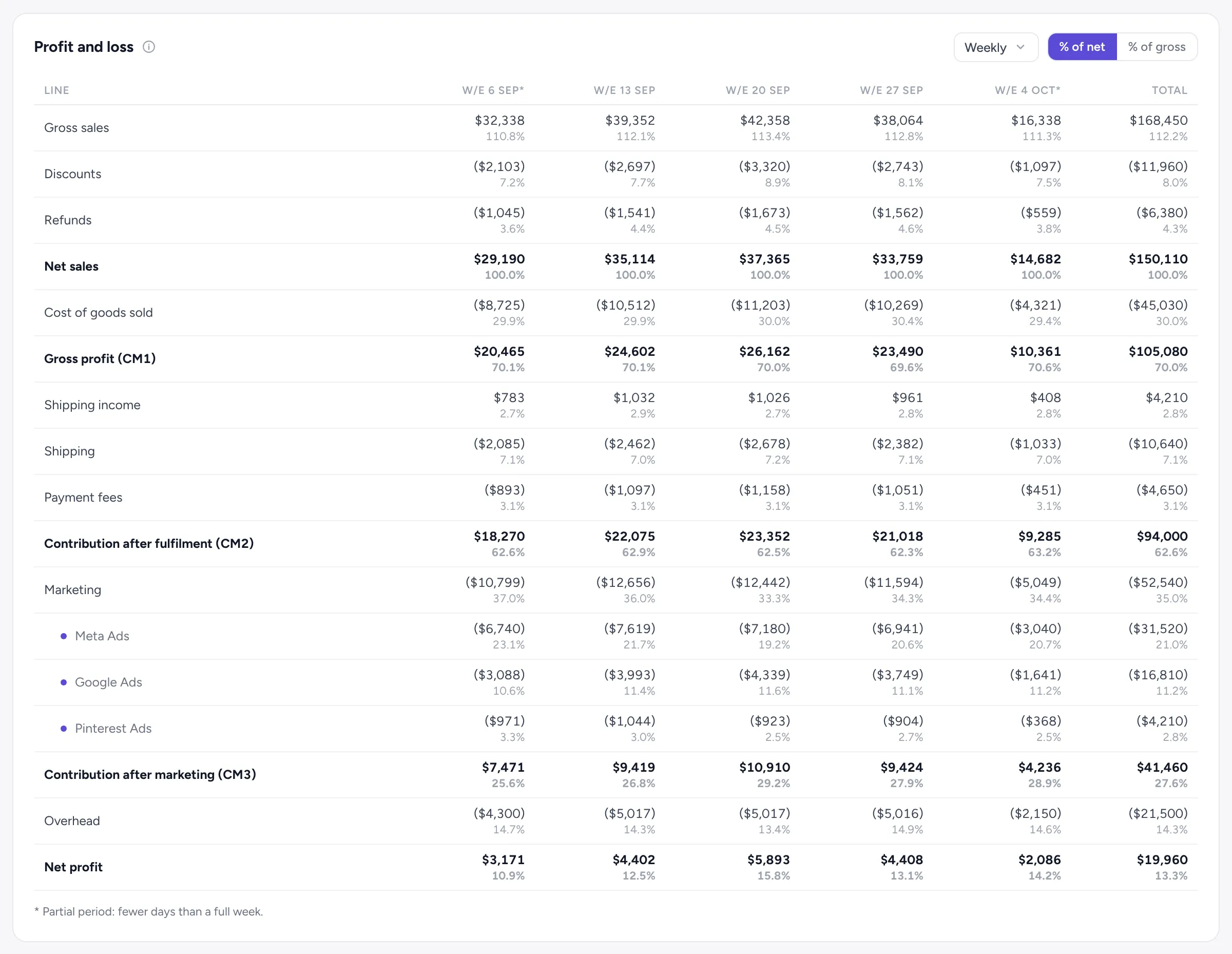
The contribution margin ladder takes your sales down to net profit one group of costs at a time. CM1, CM2 and CM3 are the steps.
If CM2 is healthy but CM3 is thin, the problem is ad spend, not your products. Now you know which lever to pull.
UNIT ECONOMICS
What does each order really earn?
One average order, from gross sales to net profit. Every cost takes its bite in the waterfall, and last period sits beside each line, so you see what changed.
WEEK BY WEEK
Spot the week your margin slipped.
The same ladder for every week, with a total. Ad spend is split by ad platform, so you can see which one moved your CM3.
PRODUCTS
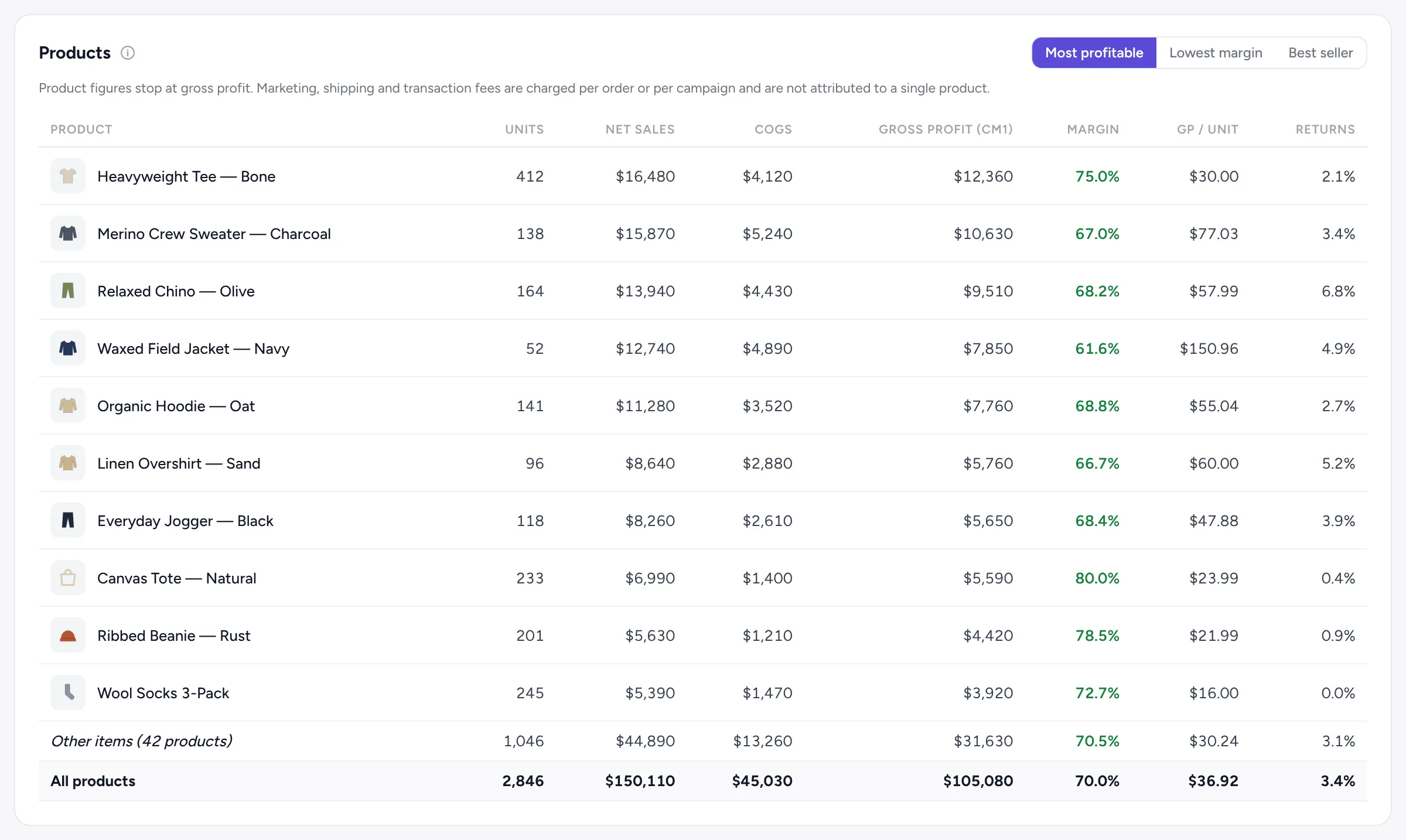
Find the products that carry you.
Rank products by gross profit, margin, profit per unit and return rate. Product figures stop at gross profit, because ads and shipping are paid per order, not per product. We don’t split them with a guess.
BREAK-EVEN MER
Know how far you can push ad spend.
Break-even MER (also called break-even ROAS) is the point where ads stop paying for themselves. AzLytics shows it right next to your MER (total sales ÷ total ad spend), so the answer is on one screen.
Break-even MER
1 ÷ margin before ad spend
Example
40% margin before ads → break-even of 2.5
An MER above 2.5 means the ads pay for themselves.
COSTS
Add costs your way. We never guess them.
Figures update within about 2 minutes of saving a cost.
From Shopify or by hand
Product costs come from Shopify, or you enter your own, plus payment fees and other expenses.
Costs with a start date
A new cost applies from the day you choose. Past months keep the cost that was true then.
Upload a file
Upload costs from a file and preview them before anything is saved.
Price rises in one step
“+X% from date Y” when a supplier puts prices up.
Real shipping costs
Connect ShipStation and the label and insurance cost of every shipment goes straight into your P&L.
Sales checked daily
Sales, discounts, returns, shipping and taxes match Shopify’s reports to the cent.
Profit questions
How do I see my Shopify store’s true profit?
Install AzLytics from the Shopify App Store, connect your ad accounts and add or confirm your product costs. The profit overview then shows net sales through to net profit, with every cost line.
What are CM1, CM2 and CM3?
CM1 is net sales minus cost of goods. CM2 adds shipping income and takes away shipping and payment fees. CM3 takes away ad spend. Net profit is CM3 minus overhead.
What happens when a cost is missing?
The figures that depend on it show “incomplete” until you add it. AzLytics never fills in a cost for you.
What does cost coverage mean?
The share of your sales that has product costs entered. At 100%, net profit is complete.
Why do product figures stop at gross profit?
Marketing, shipping and payment fees are charged per order or per campaign. Splitting them across single products would be a guess.
Find out what you really made last month.
Profit is one of four parts of AzLytics, with Attribution, Recovery Suite and Retention.
Install free on ShopifyFree during the pilot · No sales call · No developer · Cancel any time