
RECOVERY SUITE
Catch the carts Klaviyo didn’t record.
When a shopper who’s already in your Klaviyo account views a product, adds to cart or starts checkout and Klaviyo doesn’t record it, AzLytics sends the event. Your own flows follow up.
- Three events: Viewed Product, Added to Cart and Started Checkout
- Only for shoppers already in your Klaviyo account
- Not sent if they already bought or the product is out of stock
- Extra revenue measured against shoppers who got no events
30-day free trial · No sales call · No developer · Cancel any time
SOUND FAMILIAR?
Klaviyo knows the shopper. It didn’t see the cart.
THE PROBLEM
A known shopper leaves a full cart, and your abandoned-cart flow never starts.
WITH AZLYTICS
AzLytics records the add to cart with its own Shopify pixel and sends it to Klaviyo, so the flow can start.
THE PROBLEM
You can’t tell how often Klaviyo misses a browse, cart or checkout.
WITH AZLYTICS
Coverage shows each action: how many Klaviyo had, and how many it missed.
THE PROBLEM
Recovery tools take credit for every order that follows an email.
WITH AZLYTICS
AzLytics keeps a share of shoppers aside and compares. Only the difference counts as extra revenue.
HOW IT WORKS
AzLytics sends the event. Your flows send the email.
AzLytics never creates or changes Klaviyo profiles, flows, campaigns or messages.
Events carry product details only. No names, addresses, email addresses, phone numbers or payment details are sent.
A shopper acts on your store
AzLytics’ own Shopify pixel records the product view, add to cart or checkout.
AzLytics checks Klaviyo
Is the shopper already in your Klaviyo account? Did Klaviyo record the same action?
Missing events go to Klaviyo
As AzLytics Viewed Product, Added to Cart or Started Checkout, within about a minute. Use them to trigger your browse, cart and checkout flows.
COVERAGE
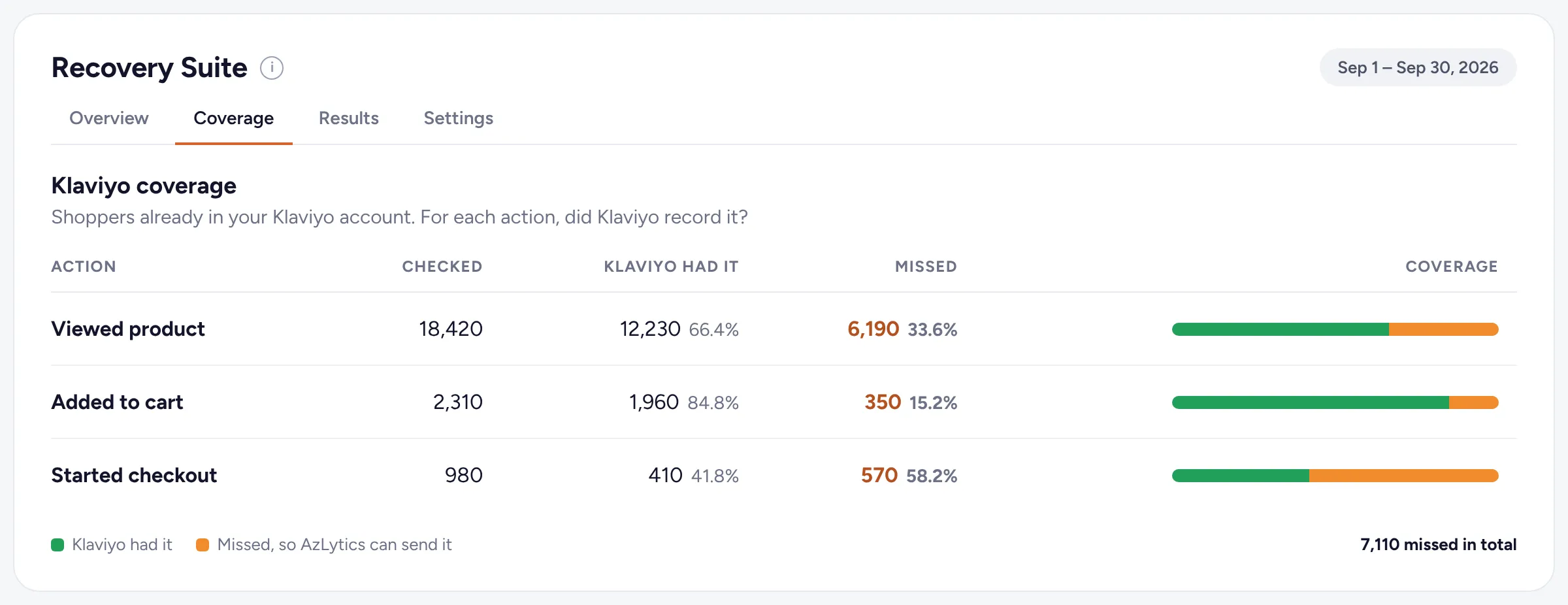
See how much Klaviyo is missing.
For each action, how many AzLytics checked, how many Klaviyo already had and how many it missed. Only shoppers already in your Klaviyo account are counted.
RESULTS
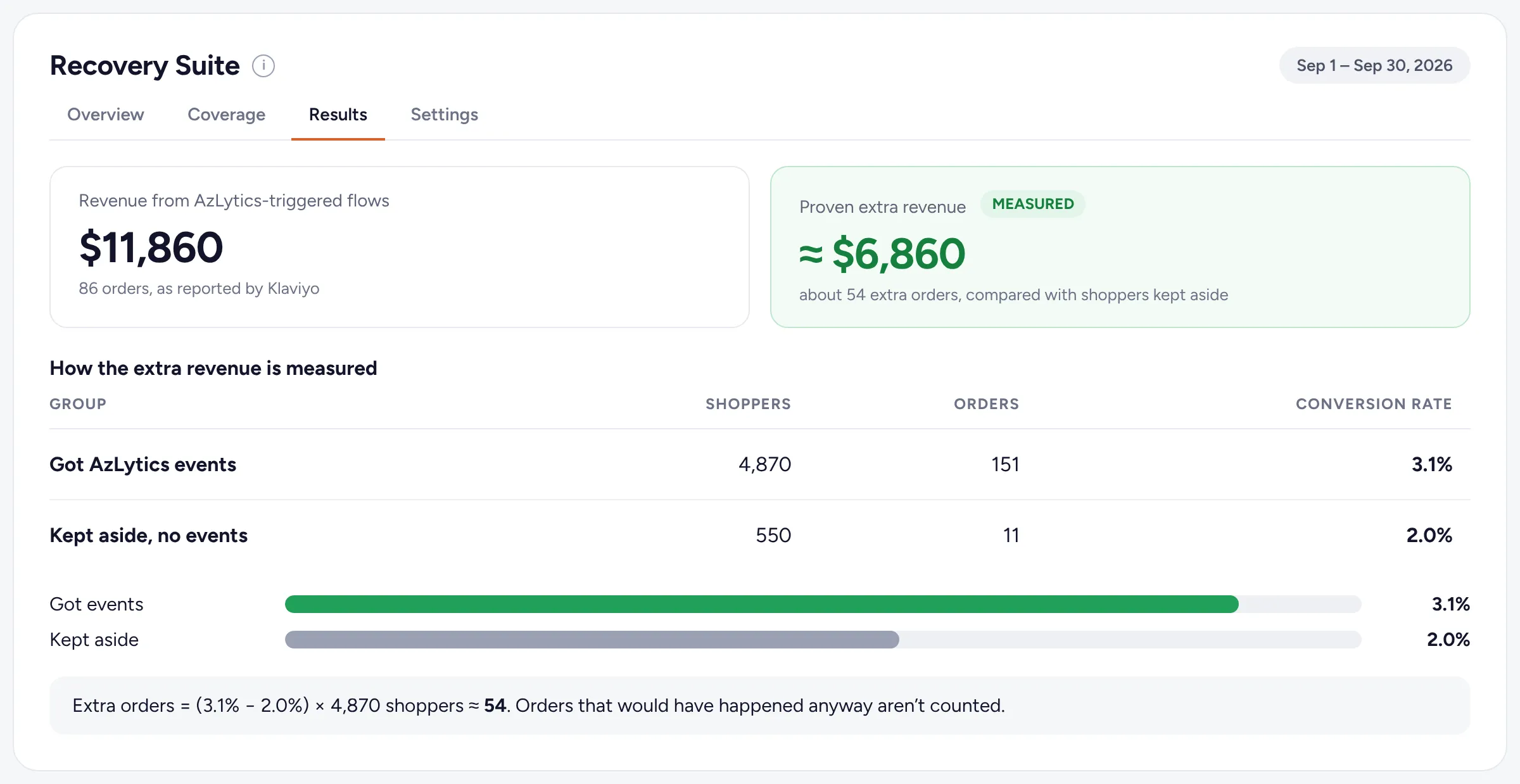
Extra revenue, checked against a holdout.
10% of eligible shoppers are kept aside and get no events. AzLytics compares how often each group orders. The difference is the extra revenue, shown next to the revenue Klaviyo reports for your AzLytics-triggered flows.
SAFEGUARDS
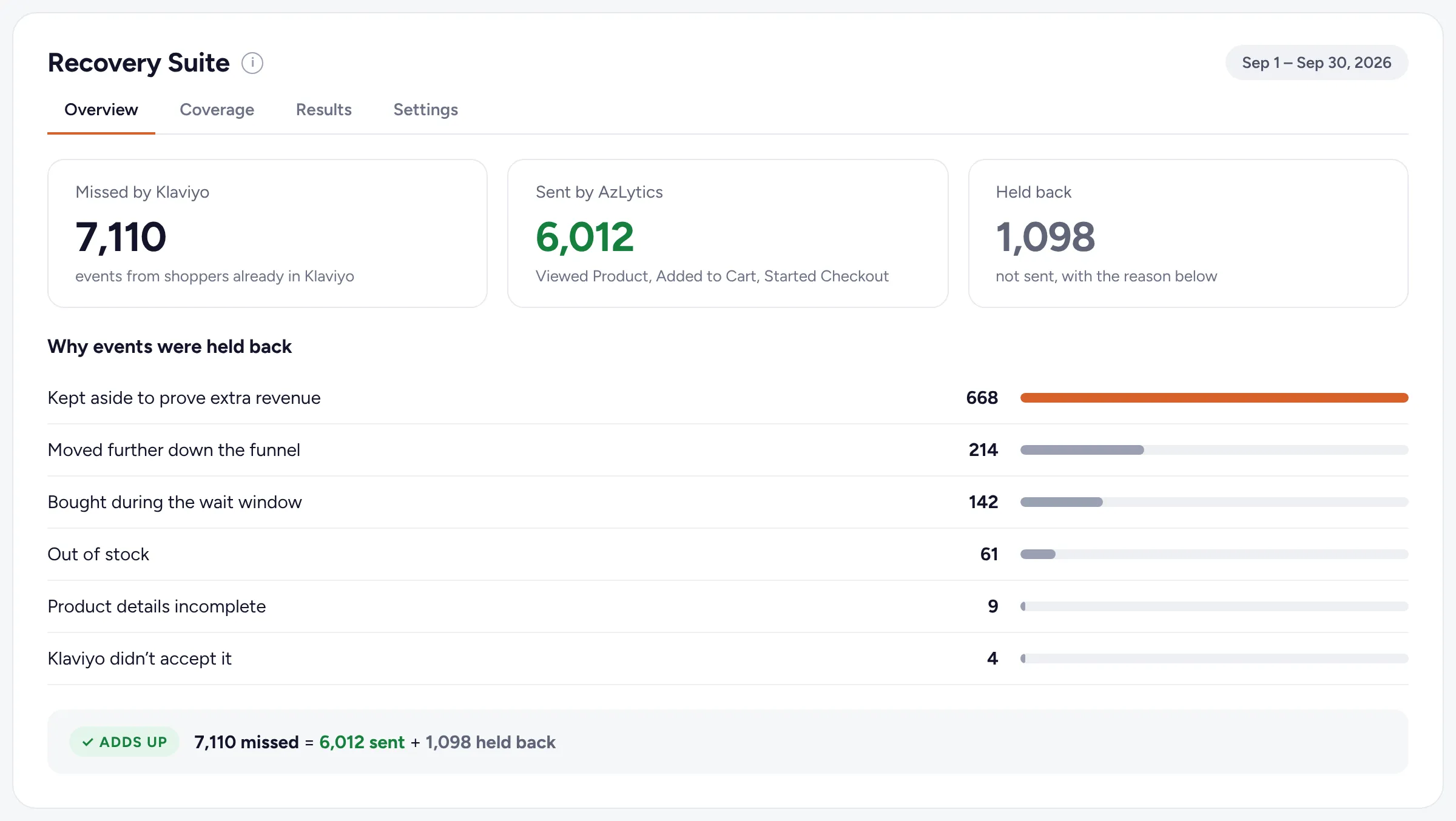
Every event that isn’t sent has a reason.
In the app, missed events = sent + held back, so none go unexplained.
Already bought
The shopper ordered before the event went out, so there’s nothing to recover.
Out of stock
No email about a product the shopper can’t buy.
Went further
When a shopper goes on from cart to checkout, only the later event is sent.
Kept aside
10% of eligible shoppers get no events, so the extra revenue can be measured.
Product details missing
An event without a product name, link or price isn’t sent, so your emails never show a blank.
Not accepted by Klaviyo
If Klaviyo turns an event down, it’s counted here instead of disappearing.
Recovery Suite questions
What do I need?
AzLytics on your Shopify store, a Klaviyo account, and Klaviyo and the AzLytics pixel connected. For the revenue figures, Klaviyo also needs your Shopify orders, through Klaviyo’s own Shopify integration.
Does AzLytics add new contacts to my Klaviyo account?
No. It only sends events for shoppers who are already in your Klaviyo account, and it never creates or changes profiles.
What does AzLytics send to Klaviyo?
Three events, AzLytics Viewed Product, AzLytics Added to Cart and AzLytics Started Checkout, with product details such as the name, link, image and price. The full list is in What AzLytics reads and sends.
How do I use the events in my flows?
Choose an AzLytics metric as the trigger of a Klaviyo flow. This guide builds a cart recovery flow step by step.
Who decides who gets an email?
You do. AzLytics only sends the events. Your flows and your Klaviyo settings decide who gets an email, and when.
Why are some shoppers kept aside?
After your first live flow on an AzLytics metric, 10% of eligible shoppers get no events. Comparing them with everyone else shows how much revenue the events added, instead of crediting every order that follows an email.
Can I turn it off?
Yes. In AzLytics, go to Recovery Suite → Settings and switch off “Send events to Klaviyo”. Nothing is sent from that moment, and Klaviyo stays connected.
See what Klaviyo is missing.
Recovery Suite comes with every plan, alongside Profit, Attribution, Retention and Acquisition.
Start free trial on Shopify30-day free trial · No sales call · No developer · Cancel any time